Measure the plans.
Price the job.
Send the quote.
A plan take-off where every line you draw is already a priced line item: your materials, your labour, your rates, your markup. Draw it yourself, or let auto take-off read the plans and do the first pass while you’re still pouring a coffee.
Take-off plan from A$159/month ex GST on a 12-month term · included in Studio
Plans in · 1 of 9
A screen recording of auto take-off in XGrafter, sped up: Auto-assign files the pages, then it measures every sheet in the drawing sets and prices it into the quote. Demo plans, example rates.
From the builder's email to a priced quote.
Six steps, all in one place. No exporting to a spreadsheet, no re-keying quantities into another program.
- STEP 1Plans in
Drop the PDF set in, or forward the builder's email to your leads inbox and the plans land on a new take-off for you.
- STEP 2Sorted
Auto-assign reads every page's title block and drawing (sheet type, floor level, printed scale) and files it into the right drawing sets.
- STEP 3Scaled
The scale comes off the title block. Calibrate against any dimension you know in two clicks, and check it against another before you trust it.
- STEP 4Measured
Draw it with the tools, or run auto take-off on a sheet, a folder or the whole set. Every measurement lands on an item.
- STEP 5Priced
Each item is a prebuild: its materials and labour per unit at your rates, plus your markup. Quantity × prebuild = a priced line.
- STEP 6Quoted
The report groups it all by cost centre and level. One click sends it to a quote with every line, quantity and rate on it.
Build a line item once. Price it every time you measure.
In XGrafter a line item you can measure is called a prebuild. You build it once (say, “External wall frame 90×45, per lineal metre”) out of what it really takes per unit: the metres of stud, plate and noggin, the nails and tie-downs, and the minutes a carpenter spends on each metre at your hourly rate.
Give it a markup, or a set price if you quote a fixed rate, and a cost centre. From then on every metre you measure is priced: materials, labour hours, cost, sell, GST, profit and margin. Change a rate in the library and the next take-off uses it.
- Material rows: quantity per unit, unit, cost and sell rate
- Labour rows: minutes per unit at your $/hr rates
- Units: ea, m, lm, m², m³, kg, set, allow
- Markup % or a set price, with a live margin gauge
- Sell ex GST and inc GST worked out for you
- A cost centre per item: Frame, Lock-up, Fit-off…
- Library folders, e.g. Framing › Install only
- Notes that print on the take-off or the quote
- Change a rate on one take-off without touching the library
- Rates lock into the quote, so later price changes never move it
- 90×45 MGP10: studs, plates & noggins3.40 lm per lm · $4.20/lm3.40 lm per lm$4.20/lmQuantity157.08 lmCost$659.74
- Nails, brackets & tie-downs1 allow per lm · $3.50/allow1 allow per lm$3.50/allowQuantity46.20 allowCost$161.70
- Carpenter24 min per lm · $68.00/hr24 min per lm$68.00/hrQuantity18.48 hrCost$1,256.64
Example rates for illustration. Your library uses your own prices and your own labour rates.
- Materials
- $821.44
- Labour (18.5 hrs)
- $1,256.64
- Total cost
- $2,078.08
- Sell ex GST
- $2,597.60
- GST
- $259.76
- Sell inc GST
- $2,857.35
Try it: pick an item, drag the quantity and the markup. It’s the same sum the take-off does on every line.
One measurement. The right quantity.
Each prebuild knows how it's measured and what quantity it prices on. Draw a wall once and the item turns it into the number the job needs.
- Count · eaeaDoors, windows, downlights, hold-downs, sinks. A pin per item.
- Length · lmlmWall frames, skirting, architrave, fascia, pipe runs.
- Area · m²m²Floor sheeting, ceilings, decking, tiling, roof sheeting.
- Perimeter · lmlmThe edge of an area: skirting round a room, edge beams, flashing.
- Vertical area: 1 side · m²m²A wall run × its height: lining or cladding one face.
- Vertical area: 2 sides · m²m²Plasterboard both sides of an internal wall.
- Vertical area: all sides · m²m²Every face of a box: columns, piers, bulkheads.
- Horizontal area · m²m²A line with a width: a 600 mm strip, a path, a membrane band.
- Volume · m³m³Area × depth: slabs, footings, fill, sand.
- Custom formula · anyanyYour own maths on the measurement, when the standard ones don't fit.
Every item carries its real dimensions, so what you draw is what gets built. A 90 mm wall frame draws 90 mm wide at scale. Its 3,065 mm height turns a wall run into square metres.
- Thickness: the band width on the plan
- Height: for vertical areas
- Width: turns a line into an area
- Offset: run the band either side of the line
- Its own colour, fill pattern and count marker
An item has one main output and up to three more. Draw an internal wall once and get the lineal metres of frame and the square metres of lining both sides. No second pass over the same wall.
Built for speed. Every tool on one key.
The tools an estimator reaches for a thousand times a day, on single keys, with the snapping and editing that stop a take-off turning into a fight with the mouse.
Length along a line with as many corners as you like.
An area from two corners. Click-click or drag.
An area by clicking each corner. Close it on the first point.
Click inside a room and it's drawn as an area. Shift takes every line, Alt the whole floor.
A pin per item. The count adds up as you click.
An area with a depth.
A text note on the sheet, for you or the crew.
Click two points of a known length to set the scale.
Select, move and reshape. Marquee, shift-click, nudge, duplicate, move to another item.
Drag the sheet around. Space-drag works from any tool.
New points snap to the corners of what's already drawn.
Points sit on the drawing's own linework, not a pixel off it.
Lock segments to 45° steps; a thin crosshair across the sheet while you draw.
Draw a hole inside an area (X) and its m² comes off: stairs, voids, light wells.
The same set, every point by hand.
Walls, openings, bracing, the floor platform, roofs and cladding, clicked point to point with the tools above, then priced into the quote.
Plans in · 1 of 9
A screen recording of a full take-off done by hand in XGrafter, sped up. Demo plans, example rates.
Let it do the first pass. You do the checking.
XGrafter’s take-off engine reads the plans the way you do: what kind of sheet it is, which floor, what scale, where the walls, rooms and openings are. It draws its measurements on the sheets with your items, so its work looks exactly like yours and checks just as fast. It runs in the background on XGrafter’s own engine, and there’s no per-run charge. Start it, go and do something else, and come back to a coloured-up set.
Reads every page and files it into your drawing sets: floor plans to the frame and floor folders, elevations to cladding, roof plans to the roof.
Tick drawing sets, folders or single items. Everything the engine knows is drawn on their sheets for you to check.
Every wall on the sheet, drawn with the wall item you've picked: external and internal kept apart.
The named rooms inside the walls become an area, with voids cut out.
Measure two or three of anything and it finds the rest. Delete the wrong ones and run it again: it learns.
Click a room and it's measured. The quickest manual area there is.
Drawing sets, folders and cost centres.
Split the take-off by stage and level: Ground floor frame, First floor frame, Roof trusses & bracing, Lock-up, External cladding. Each folder holds the items that get measured on its sheets.
Save the folders and items you use for a kind of job as a set, and load the lot onto a new take-off in one click. Every house starts the same way, with nothing forgotten.
Every item belongs to a cost centre. The report, the quote and, when it’s won, the job all follow them, so margin can be tracked from the first measurement to the last invoice.
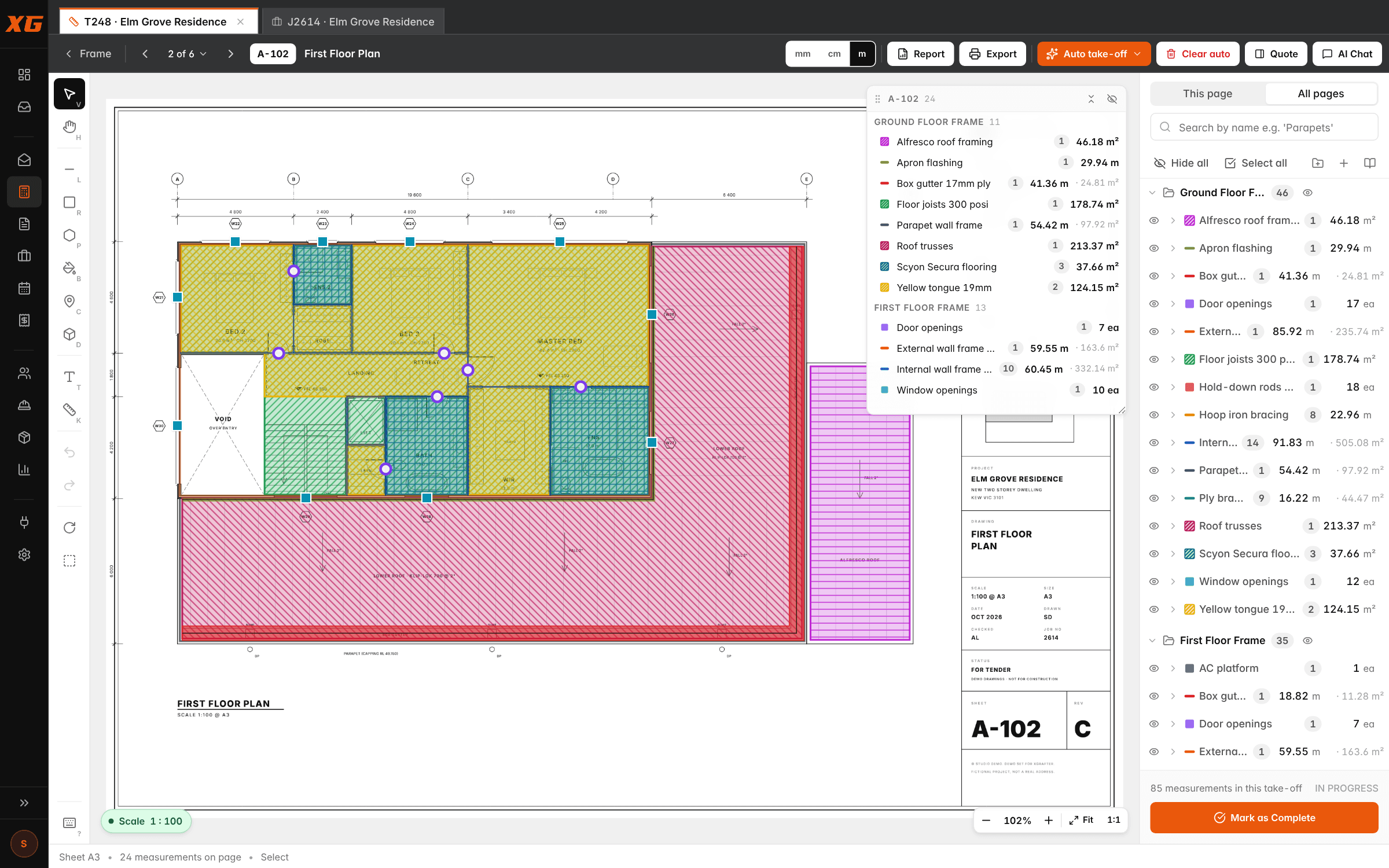
What comes out the other end.
Quantities and totals grouped by cost centre, so the numbers you check are the numbers you quote.
The take-off laid out like the quote: level breaks, per-level totals, every line priced.
Watch the price move while you measure, without leaving the plan.
Cost centres become quote sections, items become line items with their quantities and rates, notes come along.
Export the coloured-up sheets for the builder, the crew or the file.
An AI chat beside the take-off for quick questions about the drawings while you work.
Just the take-off, or the whole business.
20% less than no lock-in, billed monthly, and your first 2 field licences free.
The take-off tool on its own. Measure, price and quote.
- Take-off tool with every measuring tool
- Auto-assign + auto take-off
- Your prebuild library: materials, labour rates, markup
- Reports, marked-up PDFs and quotes from the take-off
- Unlimited office logins
The whole business on one login: lead to final invoice.
- Everything in Take-off
- Leads inbox: emailed jobs become take-offs
- Jobs, cost-centre margins and scheduling
- Variations, progress claims and invoicing
- Xero, on your own account
- Unlimited office logins
- 14-day free trial
- No setup fee, free standard migration
- Unlimited office logins
- Price locked for your term
- Australian-owned and hosted
The ones we get asked.
What plans does it work with?+
PDF plan sets: the same files builders and architects send you, any sheet size. The scale is read off the title block, and you can calibrate or check it on any page. Auto take-off does its best work on CAD-drawn PDFs; scanned sheets can always be measured by hand.
Do I have to set up every prebuild before I start?+
No. Create items on the fly from inside a take-off with Quick create, and tidy the rates later. If you're coming off another system, we'll bring your price list and labour rates across. See Migrations.
Is it only for carpenters?+
No. Items, units, measure types and formulas are all yours, so it measures pipe runs, tile areas, paint walls, downlights or linear drainage just as well. Auto take-off knows carpentry scopes out of the box (frame, lock-up, fix, fit-off, cladding), and trade packs for tilers, plumbers, sparkies, painters and plasterers are on the way: set your trade and auto take-off goes after that trade's items. Until then, Find more like these learns any item from the two or three you measure.
Does auto take-off replace the estimator?+
No. It does the first pass, the hours of clicking, and draws it exactly like you would, so checking is quick. Every line it draws is a normal measurement you can move, reshape, re-assign or delete. Clear auto removes its rows without touching yours.
Can I lease just the take-off?+
Yes. The Take-off plan is the take-off tool with auto take-off, your prebuild library, reports, marked-up PDFs and quotes from the take-off. Studio is the full platform: take-off plus leads, jobs, scheduling, variations, invoicing and Xero, with field licences for your crew on top.
Who can see my plans and rates?+
Your company and nobody else. Every company's records and files are locked to that company at the database level, and the data is hosted in Australia.
Bring a plan set. We’ll take it off with you.
Half an hour on a screen share with one of your own jobs. You’ll know by the end whether it fits.