Construction take-off software, made in Australia.
Measure PDF plans on screen, let auto take-off do the first pass, and price every line in Australian dollars at your own rates. Built in Melbourne by a tradie, hosted in Australia, and metric from the ground up.
Take-off plan from A$159/month ex GST on a 12-month term · runs in your browser, nothing to install
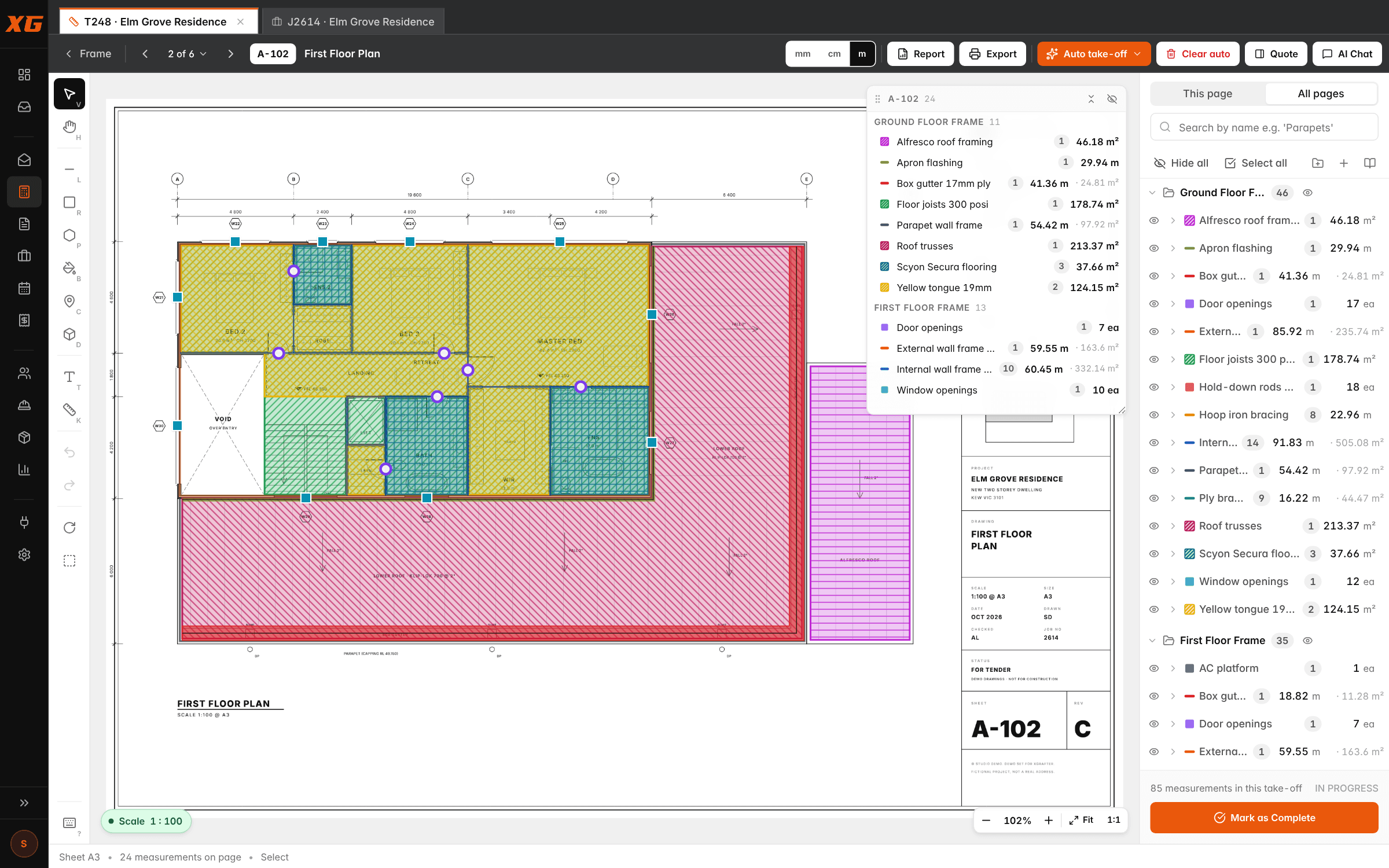
Australian plans, Australian dollars, Australian servers.
XGrafter is built in Melbourne by a tradie, for trade businesses that work for builders. It measures in lineal metres, square metres and cubic metres, prices in AUD ex GST with the GST worked out for you, and connects to Xero.
Your data is hosted in Australia (Sydney region), and every company's records and files are locked to that company at the database level.
- Metric units: ea, m, lm, m², m³, kg, set, allow
- Prices in AUD, sell ex GST and inc GST
- Data hosted in Australia (Sydney region)
- Two-way Xero on Studio; MYOB in the coming months
Your items, your units, your formulas.
Items, units, measure types and formulas are all yours, so it measures pipe runs, tile areas, paint walls, downlights or linear drainage as well as it measures wall frames. Auto take-off knows carpentry scopes out of the box (frame, lock-up, fix, fit-off and cladding), and trade packs for tilers, plumbers, sparkies, painters and plasterers are on the way.
Until your trade's pack lands, Find more like these learns any item from the two or three you measure, and finds the rest on the sheet.
One measurement, the right quantity.
Each item knows how it's measured and what quantity it prices on. Draw a wall once and the item turns it into the number the job needs, and one line can give up to four quantities: the lineal metres of frame and the square metres of lining both sides, from the same wall.
- Count (ea) and length (lm)
- Area and perimeter
- Vertical area: one side, two sides or all sides
- Horizontal area: a line with a width
- Volume: area × depth for slabs and footings
- Custom formula when the standard ones don't fit
The first pass, done while you open the PDF.
Auto-assign reads every page's title block and drawing (sheet type, floor level, printed scale) and files it into your drawing sets. Run auto take-off on a sheet, a folder or the whole set and it draws its measurements with your items, exactly as you would, for you to check.
Every line it draws is a normal measurement you can move, reshape, re-assign or delete. Clear auto removes its rows without touching yours.
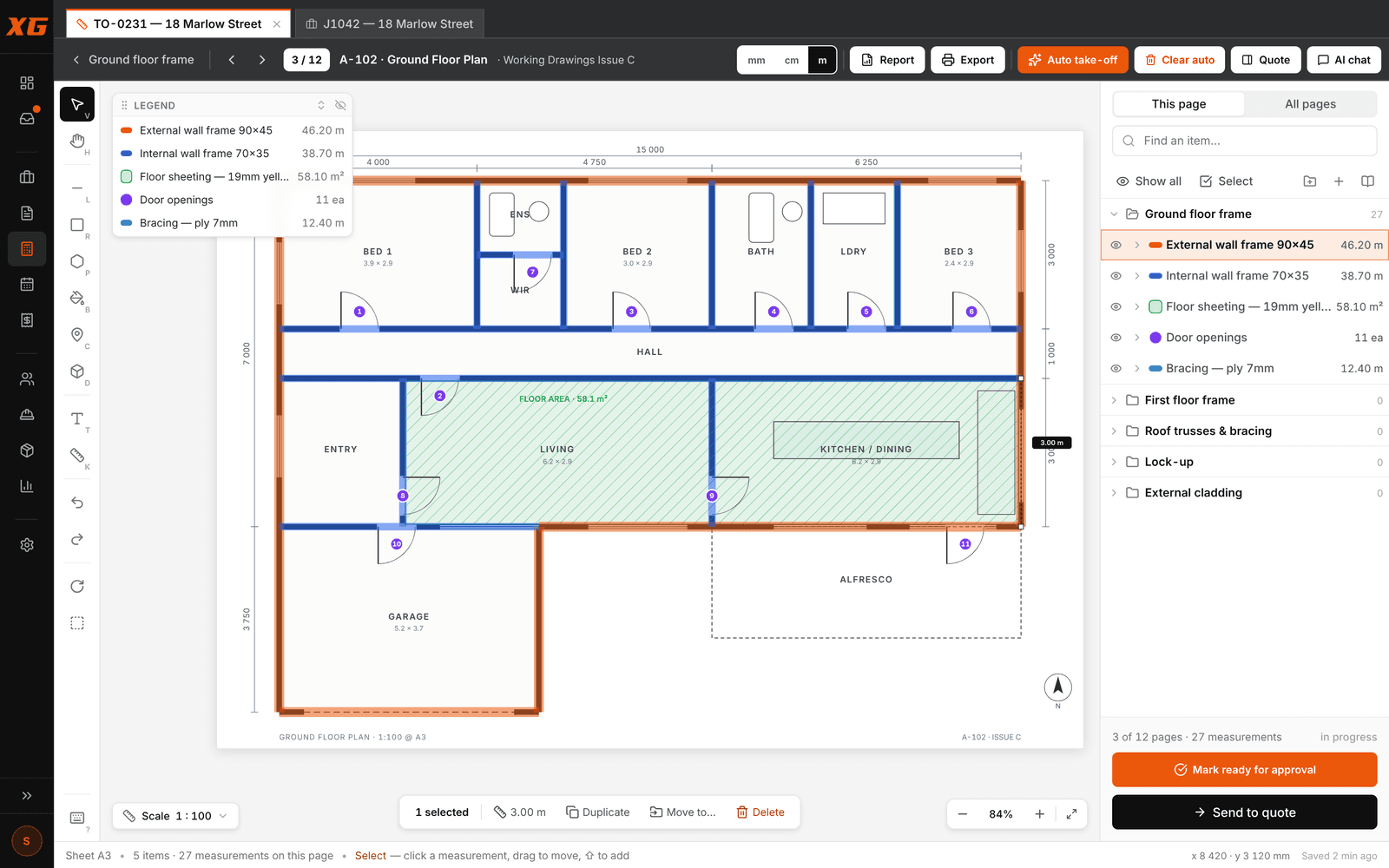
Reports, quotes and marked-up plans.
The take-off report groups quantities and totals by cost centre; the quote-format sheet lays them out like the quote, with level breaks and per-level totals; and one click turns it into a quote. Export the coloured-up sheets as a marked-up PDF for the builder, the crew or the file.
The ones we get asked.
Is my data stored in Australia?+
Yes. XGrafter's database is hosted in Australia (Sydney region), and every company's records and files are locked to that company at the database level.
Do I need to install anything?+
No. XGrafter runs in your web browser. The field app for the crew opens on any iPhone or Android phone, with App Store and Google Play versions on the way.
Which trades does it suit?+
Any trade that measures off plans. Auto take-off knows carpentry scopes out of the box; for other trades you build your own items and Find more like these learns them from a few examples. Trade packs for tilers, plumbers, sparkies, painters and plasterers are on the way.
Are the prices in Australian dollars?+
Yes. Plans are priced in AUD ex GST: the Take-off plan is A$159 a month on a 12-month term, and Studio, the whole platform, is A$319 a month plus A$20 per field licence.
What plans does it read?+
PDF plan sets, any sheet size. The scale comes off the title block and you can calibrate or check it on any page. Auto take-off works best on CAD-drawn PDFs; scanned sheets can always be measured by hand.
Every tool, the shortcuts, auto take-off and the quote, with screen recordings.
Frame, lock-up, fix, fit-off and cladding, out of the box.
The labour number every take-off should be priced from.
Bring a real job. We’ll run it with you.
Half an hour on a screen share with one of your own plan sets. You’ll know by the end whether it fits.