Carpentry take-off software that prices as you measure.
Drop the builder's PDF set in. XGrafter sorts the pages, reads the scale, and auto take-off does the first pass on frame, lock-up, fix, fit-off and cladding. Every line is already priced at your rates, so the take-off is the quote.
Take-off plan from A$159/month ex GST on a 12-month term (A$199 no lock-in) · included in Studio
Plans in · 1 of 9
A screen recording of auto take-off in XGrafter, sped up, on a demo plan set with example rates.
Frame, lock-up, fix, fit-off and cladding, out of the box.
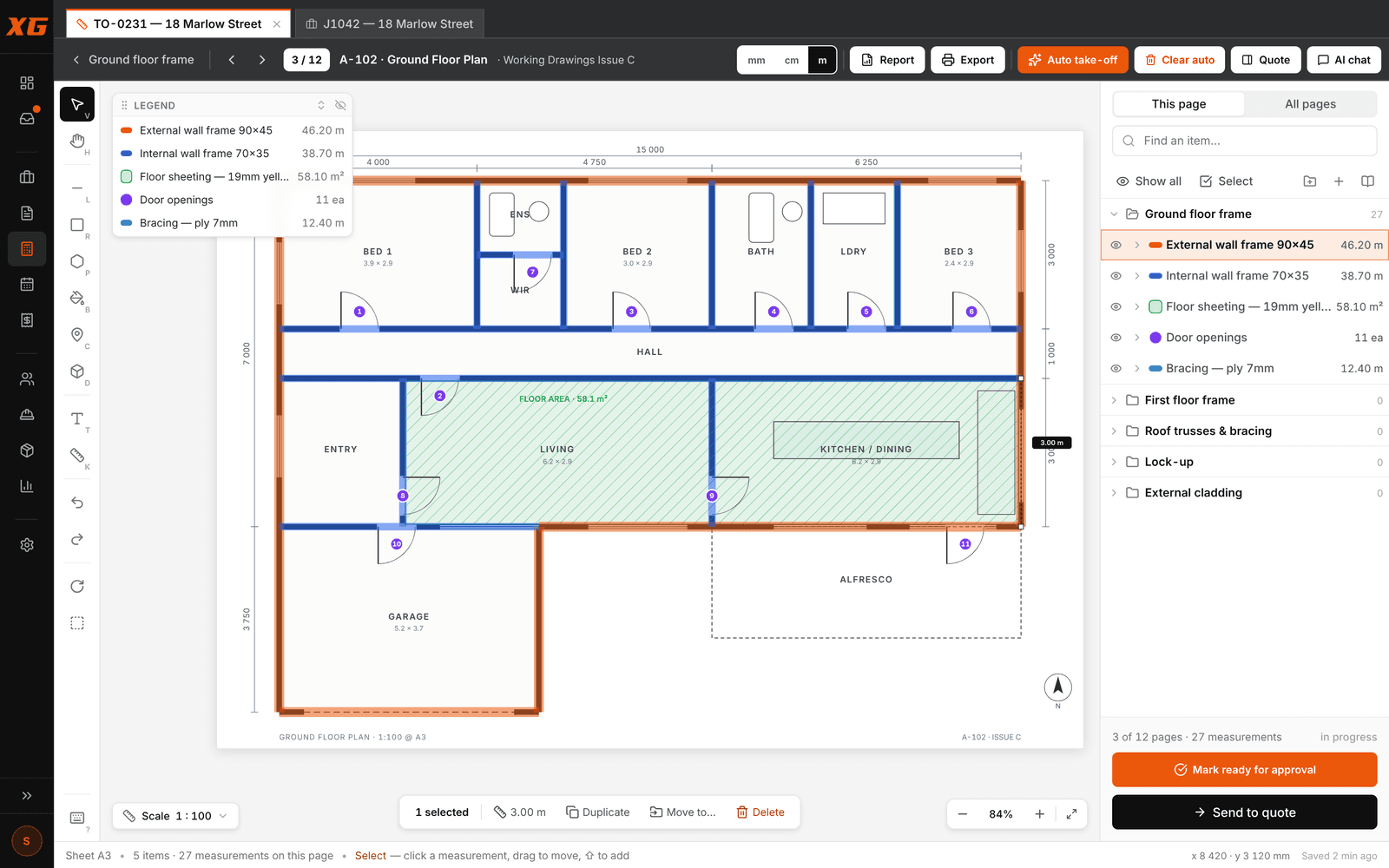
Auto take-off already knows the carpentry stages. Run it on a sheet, a folder or the whole set and it finds the walls (external and internal kept apart), fills the rooms as floor areas with the voids cut out, and counts the doors, then draws every measurement with your own items, the way you would.
For anything it doesn't know yet, measure two or three and Find more like these finds the rest. Delete the wrong ones and run it again: it learns. Every line it draws is a normal measurement you can move, reshape or delete.
- Find walls: every wall run, drawn with the wall item you pick
- Floor area: named rooms become an area, voids cut out
- Door counts, plus a count tool for windows, hold-downs and fittings
- Find more like these: learns any item from 2–3 examples
- Clear auto removes its lines without touching yours
- Works best on CAD-drawn PDFs; scans can be measured by hand
The pages file themselves.
Auto-assign reads each page's title block and drawing (sheet type, floor level, printed scale) and files it into your drawing sets: floor plans to the frame and floor folders, elevations to cladding, roof plans to the roof.
The scale comes off the title block. Calibrate against any dimension you know in two clicks, and check it against another before you trust it. On Studio, forward the builder's email to your leads inbox and the plans land on a new take-off for you.
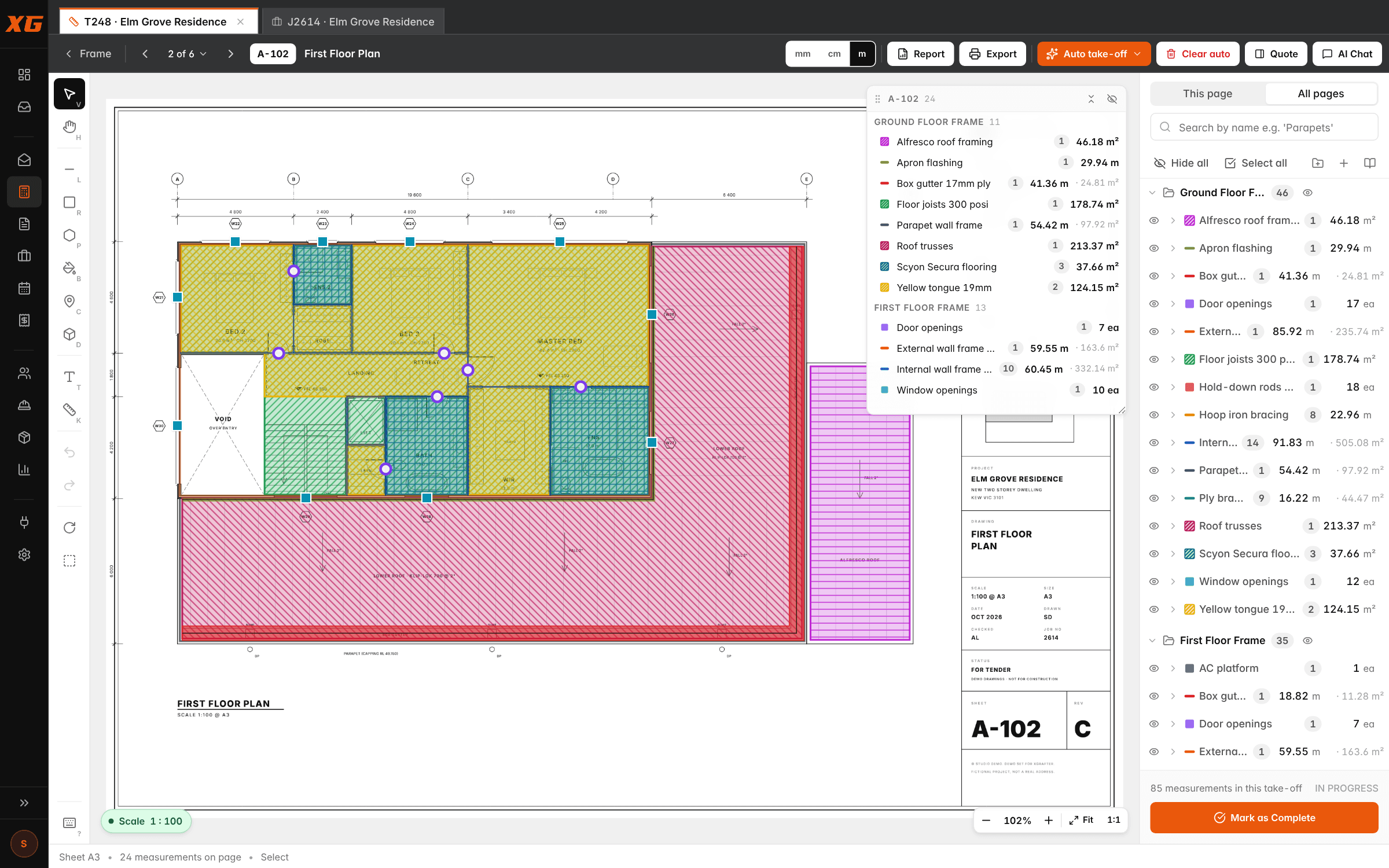
Lineal metres, square metres, counts and walls in one go.
Each item knows how it's measured. A wall frame is a length; lining one or both sides is a vertical area; skirting round a room is a perimeter; a slab is a volume. Draw an internal wall once and get the lineal metres of frame and the square metres of lining both sides, without a second pass.
- Length (lm): frames, skirting, architrave, fascia
- Area (m²): floor sheeting, ceilings, decking
- Vertical area, one side, two sides or all sides
- Count (ea): doors, windows, hold-downs
- Cut-outs for stairs, voids and light wells
- Snap to the drawing's lines, ortho lock, single-key tools
Every metre you draw is already a priced line.
In XGrafter a line item you can measure is a prebuild. Build it once (say, "External wall frame 90×45, per lineal metre") from the stud, plate and noggin per metre, the nails and tie-downs, and the minutes a carpenter spends on each metre at your hourly rate.
Give it a markup or a set price and a cost centre, and every metre you measure shows its materials, labour hours, cost, sell, GST, profit and margin. Change a rate in the library and the next take-off uses it, and rates lock into the quote so a later change never moves it.
Grouped by level and cost centre, the way builders read it.
The take-off report groups the quantities by cost centre, and the quote-format sheet lays it out like the quote: level breaks, per-level totals, every line priced. One click sends it to a quote with every line, quantity and rate on it, notes included.
Export the coloured-up sheets as a marked-up plan PDF for the builder or the crew, so the quantities are easy to check and it's obvious what's in the price.
The ones we get asked.
What plans does it work with?+
PDF plan sets: the same files builders and architects send you, any sheet size. The scale is read off the title block, and you can calibrate or check it on any page. Auto take-off does its best work on CAD-drawn PDFs; scanned sheets can always be measured by hand.
Does auto take-off replace the estimator?+
No. It does the first pass, the hours of clicking, and draws it the way you would, so checking is quick. Every line it draws is a normal measurement you can move, reshape, re-assign or delete.
Can I use my own rates and items?+
Yes. Items, units, rates and markups are all yours. Create items on the fly from inside a take-off and tidy the rates later; if you're coming off another system, we'll bring your price list and labour rates across.
Can I lease just the take-off?+
Yes. The Take-off plan is the take-off tool with auto take-off, your prebuild library, reports, marked-up PDFs and quotes from the take-off, from A$159 a month ex GST on a 12-month term. Studio adds leads, jobs, scheduling, variations, invoicing and Xero.
Who can see my plans and rates?+
Your company and nobody else. Every company's records and files are locked to that company at the database level, and the data is hosted in Australia.
Every measuring tool, auto take-off, prebuilds and the quote, with a full recording.
Unit rates from your own job hours and your real labour cost.
Take-off on its own or the whole business on Studio. No lock-in, or save on a 12-month term.
Bring a real job. We’ll run it with you.
Half an hour on a screen share with one of your own plan sets. You’ll know by the end whether it fits.