Every module.
In detail.
Not a feature list. A walkthrough. What each module actually does, how it's built, and what it costs your business when you try to run without it.
Read a plan set in minutes. Get quote-ready quantities.
A take-off engine that sorts the pages, finds the walls, rooms and openings, and measures them with your own priced items while you're still opening the PDF.
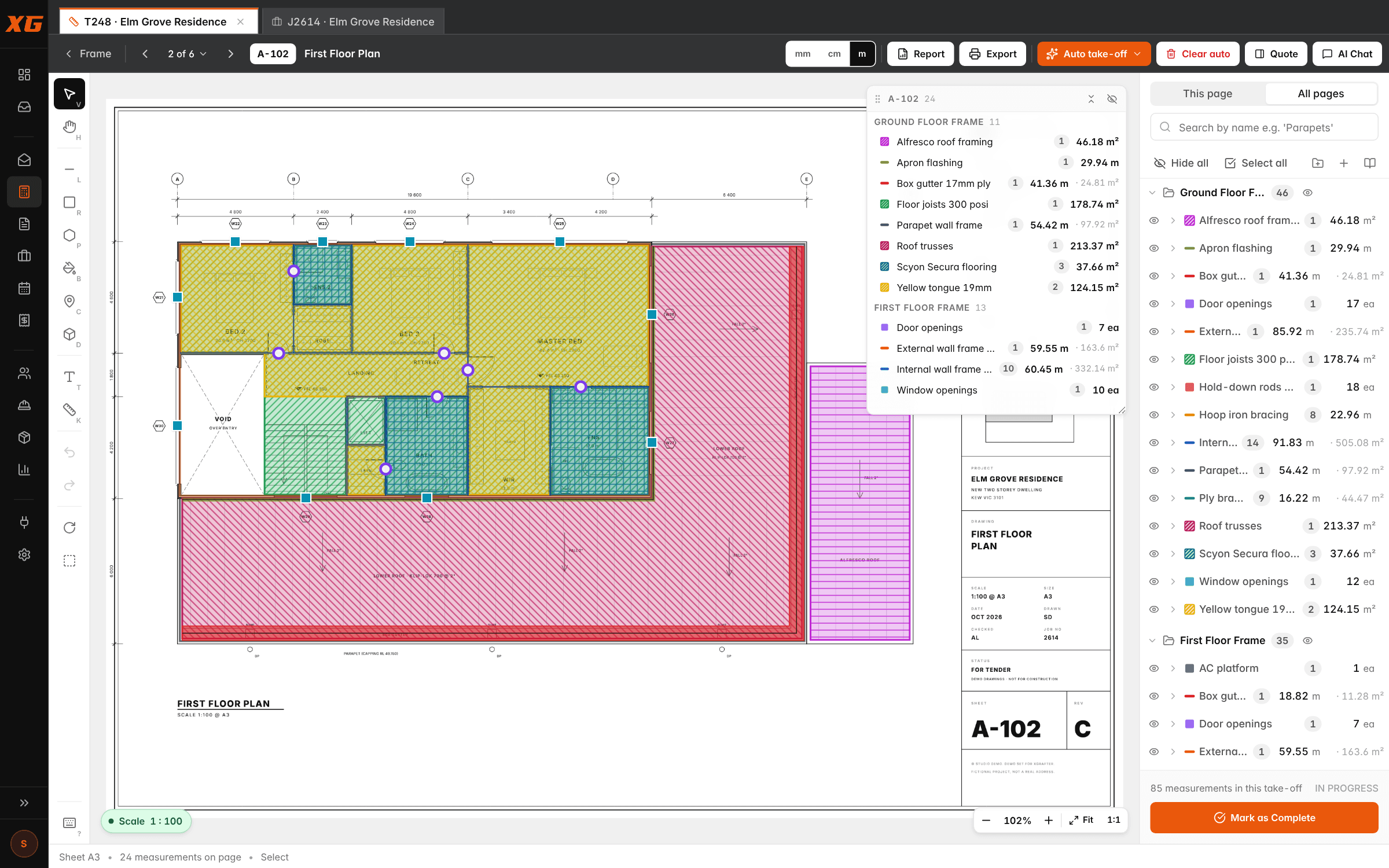
The take-off that used to eat two evenings a week is now the twenty minutes between the meeting and lunch. Multiply that across a year of quotes and you get most of a project manager back.
Drop the PDF set onto a take-off and XGrafter reads every page: what kind of sheet it is, which floor, what scale. Pages file themselves into your drawing sets: floor plans to the frame and floor folders, elevations to cladding, roof plans to the roof.
Run auto take-off on a sheet, a folder or the whole set. It finds the walls, fills the rooms, counts the doors and draws its measurements with your items, exactly the way you would. For anything it doesn't know yet, measure two or three and Find more like these finds the rest, learning as you correct it.
Every item is a prebuild: the materials and labour it takes per unit at your rates, with your markup. So every measurement is already a priced line: lineal metres for wall runs, m² for floors and linings, counts for openings and fittings. Draw it by hand with single-key tools when you'd rather.
The output isn't a spreadsheet you have to re-enter. The take-off goes to a quote by cost centre with your rates on it. What used to be two nights with a highlighter and a scale ruler is a coffee and a review.
See the take-off tool in full- Reads every page: sheet type, floor level, printed scale
- Auto-assign files pages into your drawing sets
- Auto take-off: walls, floor areas, door counts and more
- Find more like these: learns any item from 2–3 examples
- Linear, area, fill-a-room, count and volume tools on single keys
- Prebuilds priced from materials + labour at your rates
- Report by cost centre, quote-format sheet, marked-up PDFs
- Send to quote in one click
Quote → Job → Cost Centres → Line Items → Invoices. One thread.
Every number, doc, variation and PO stitched to the job. No more digging Gmail for what you agreed six weeks ago.
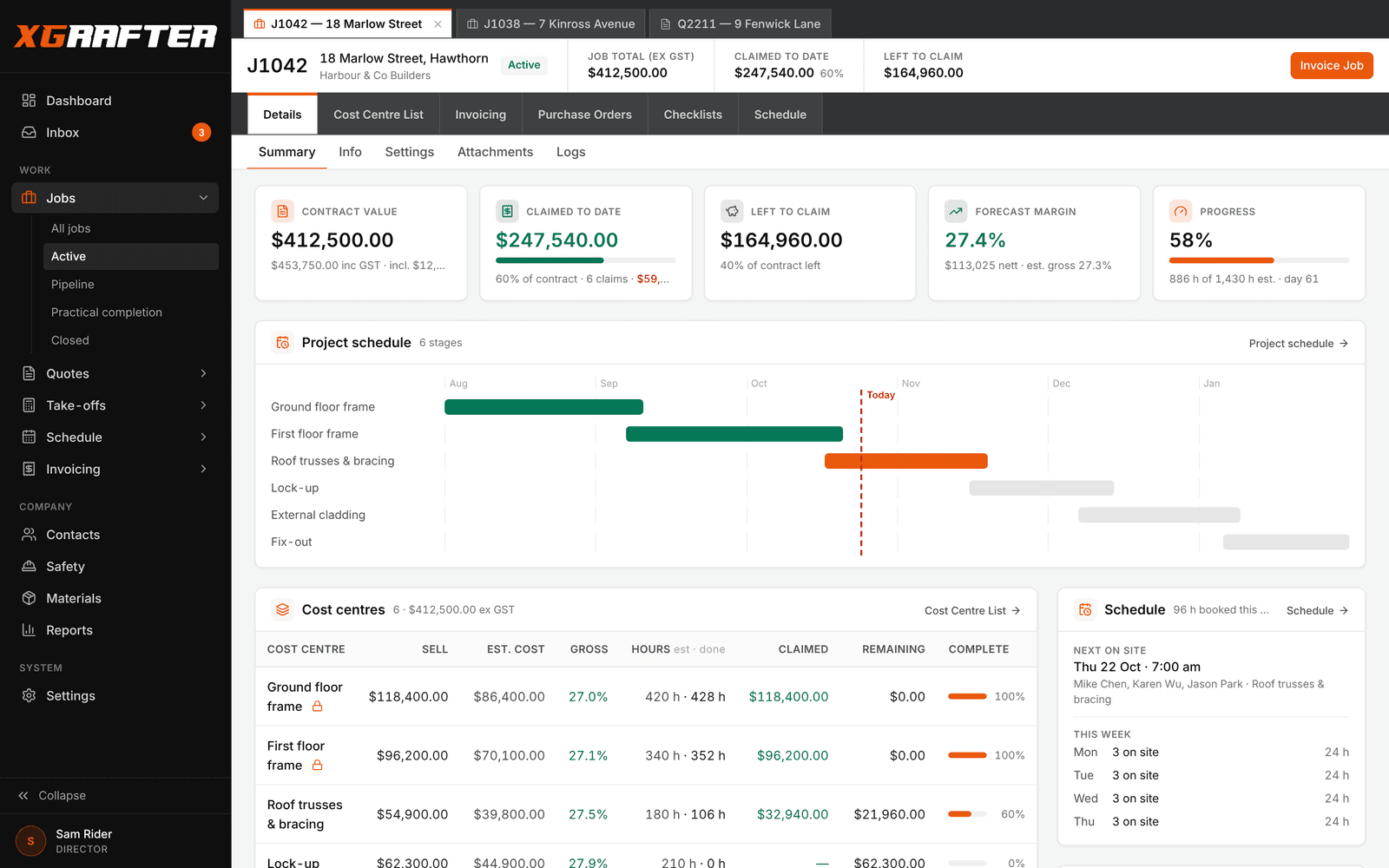
Emails to find approvals. Spreadsheets that don't match Xero. Handover meetings that turn into archaeological digs. A job with no central spine costs you every time a PM changes hands.
A job in XGrafter isn't a header row on a spreadsheet — it's a live workspace. The moment a quote is accepted, it becomes a job carrying every cost centre, every line item, every markup, every doc, every note. You navigate from the job to the CC to the exact line item to the invoice claim without ever leaving the thread.
Cost centres behave like mini-jobs inside the main job. Each one has its own parts + labour, its own decimal quantities from the take-off, its own schedule, and its own lock/unlock state so you can freeze scope on the ones that are done and keep working the rest. Margin is visible per CC in real time — no discovering you underquoted after handover.
The whole thing runs at full feature parity. Statuses (Pending / In Progress / Complete / Invoiced / Archived), stages, technicians, salesperson, tags, retention — all there. Rich-text scope docs and notes live inside the job. Variations, POs, invoices and photos all timeline into a single activity view so a new PM can read a job from the top in five minutes.
The customer-facing side is quiet on purpose: branded quote PDFs with your logo and ABN, clean line-item descriptions, and a signable link. The internal side is where the depth lives.
- Full flow: Quote → Job → Cost Centres → Line Items → Invoices, all linked
- Cost centre detail page with parts + labour, markup, decimal quantities, per-CC lock/unlock
- Rich-text scope docs and job notes
- Full status set (Pending / In Progress / Complete / Invoiced / Archived)
- Stages, technicians, salesperson, tags, retention config per job
- Variations, POs, invoices, photos on a unified timeline
- Prebuild templates for common job types across every trade
- Customer-facing branded quote + invoice PDFs
The runsheet your leading hand will actually open.
Week grid + day + month + job-focus views. Drag-and-drop. Cost rolls up to the CC. Crew sees it on their phone in seconds.
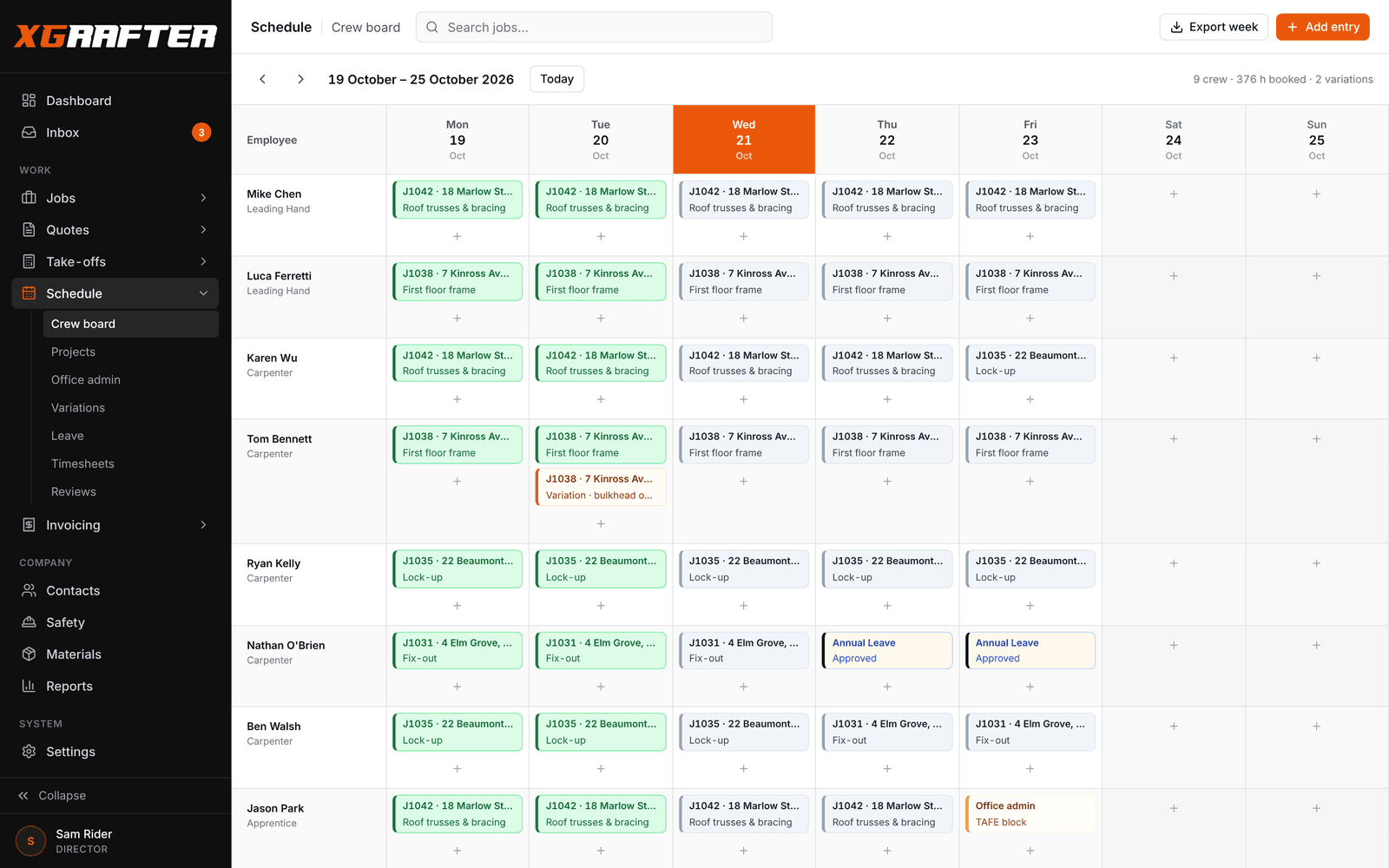
The Monday morning phone tree — where's Dan today, is Kev on the tools or the ute, who's got the framing gang — disappears. One update in the office, twelve phones update themselves.
Scheduling in XGrafter is a real schedule, not a to-do list with dates. The week grid is 7 days across × your employees down — the same shape a foreman would draw on the whiteboard. Drag a block from Monday-Kev to Tuesday-Dan and the change lands in the mobile app before Dan puts his phone back in his pocket.
Switch to Day view when you're planning tomorrow. Month view when you're pacing a build. Job Focus view when a client wants to know exactly what's happening on their site this fortnight. Same data, four lenses.
Every schedule block is routed to a specific job and a specific cost centre. When Dan clocks eight hours against Bracing on 42 Bourke Street, that labour cost rolls straight up to the CC and shows up in the margin view. No shadow spreadsheet, no reconciliation.
The mobile app is the delivery mechanism. Push notifications for schedule changes. Live sync down to the device in seconds. End-of-day timesheet confirmation with variation flagging — so the crew can say what actually happened instead of what you thought would happen.
- Week grid (7 days × employees), Day view, Month view, Job Focus view
- Drag-and-drop reassign between employees
- Cost centre routing — schedule to a specific job's CC
- Labour cost rolls up to the CC automatically
- Live sync to the mobile app — seconds, not minutes
- Push notifications for schedule changes
- End-of-day timesheet confirmation with variation flagging
- Colour-coded by job for foreman clarity
The crew's whole day, on the phone in their pocket.
Schedule, jobs, plans, timesheets, variations, tasks, leave and SWMS. Big buttons, plain words, nothing they don't need.
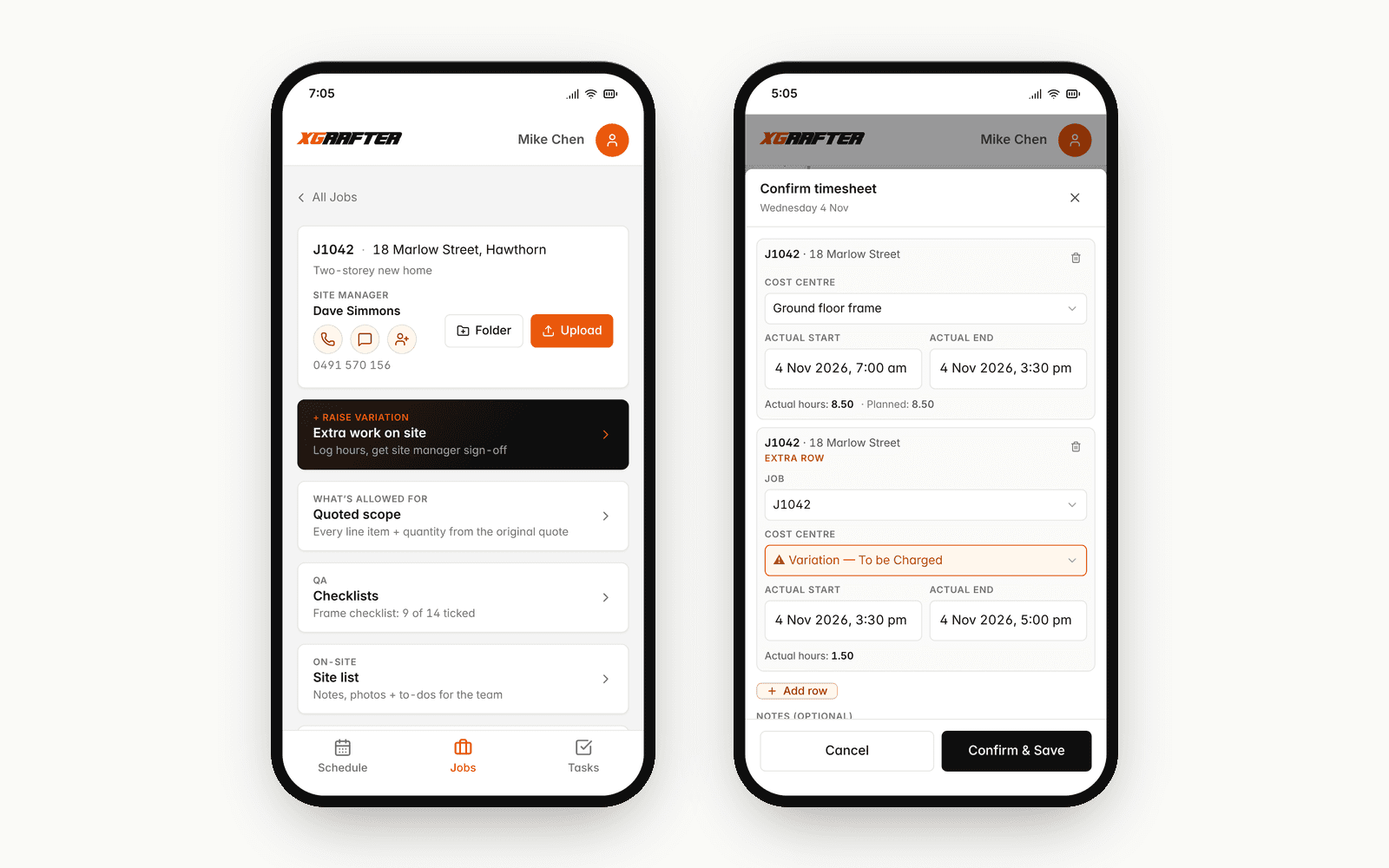
The gap between what happened on site and what the office knows. That gap is where variations get lost, where hours get under-billed, and where every 'we never agreed to that' conversation starts.
The field app puts the crew's day on the phone they already carry: where they're working, when, who else is on the job, and the job itself, with the site manager a tap away. When the office moves a shift it moves on their phone, and in the phone app a buzz tells them when they've been put on a new one.
Every job carries the quoted scope (line items and quantities, never your prices), the checklists, the site list and the job's folders of plans and files. Drawings open full screen to pinch and zoom, and photos go straight from the camera into the job.
Variations get raised on site: what the extra work was, the hours by labour type, and the site manager's signature on the phone. It lands in the office's variations inbox as a draft, ready to price and send off.
End-of-day timesheet is a two-tap confirmation of what was scheduled versus what actually happened. If Dan spent an extra two hours because the plumber didn't rock up, he adds a row and flags it as a variation to be charged. It turns up on the schedule marked to bill, so the hours don't get lost.
See the field app in full- Any iPhone or Android; App Store and Google Play versions on the way
- Day and week schedule, and who's on each job with them
- Quoted scope with quantities, never prices
- Job folders: plans open full screen, photos straight from the camera
- Field notes on any schedule entry, visible to the office
- On-site variations signed by the site manager
- End-of-day timesheet confirm with actual hours per cost centre
- Big buttons — built for a gloved hand, not a suit's thumb
Log on site in 30 seconds. Raise + invoice in one click.
Every variation captured, priced and paid — or filed as no-charge with a reason. Nothing forgotten. Nothing eaten.
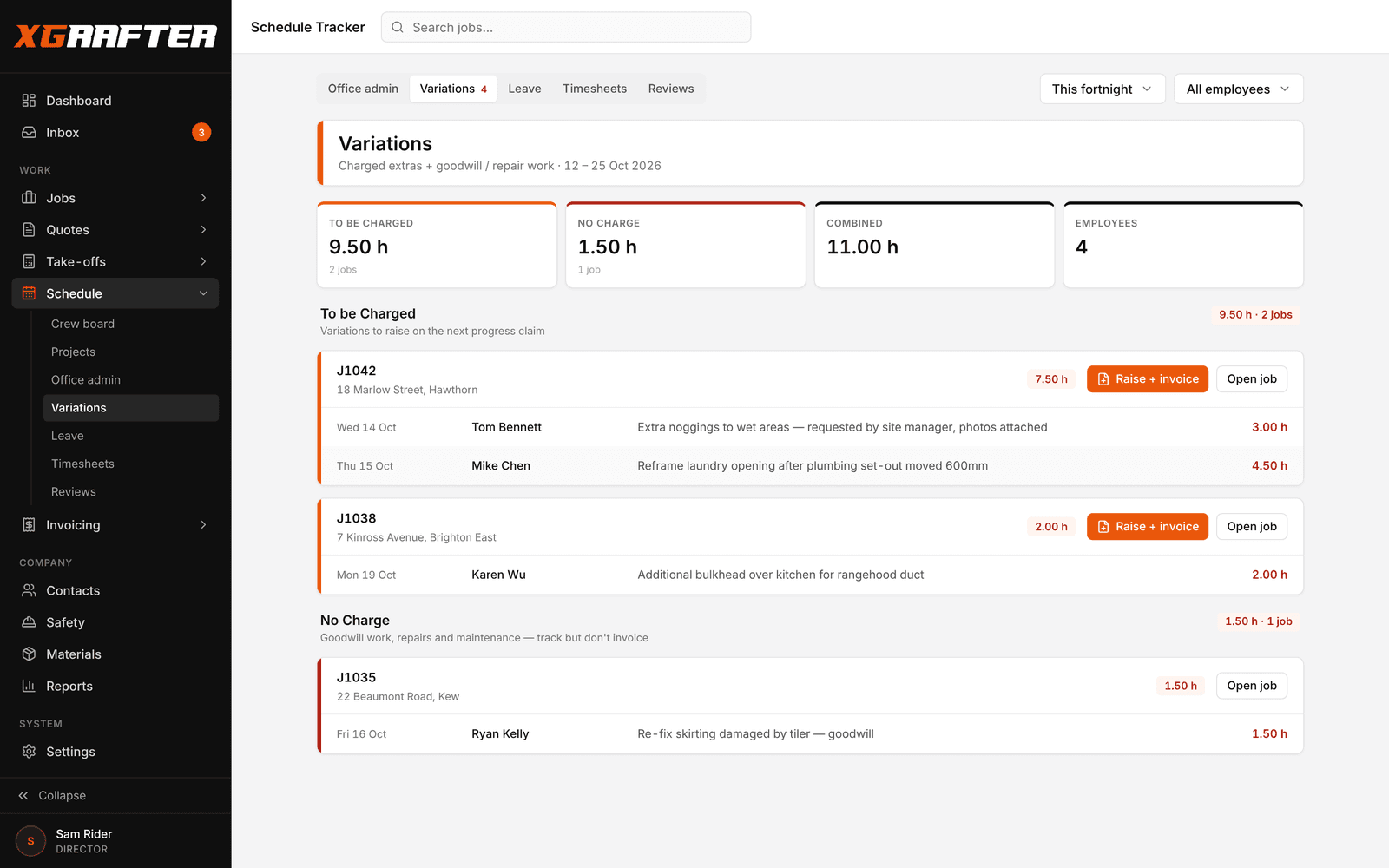
Most trades lose 2–5% of their revenue to un-invoiced variations. A crew of eight, over a year, that's the price of a decent ute. XGrafter turns 'log it, raise it, chase it' into three taps.
An employee logs a variation on site in thirty seconds via the field app. Photo, note, cost centre, to-be-charged vs no-charge flag. Done. The office sees it in the Variations tracker as soon as the phone catches signal.
The tracker cleanly separates variations that are going to be charged from ones that are being absorbed. The no-charge column isn't a rubbish bin — it's a record. When a client asks 'why did we go over budget?' you've got the whole list, priced, with reasons.
One click on a to-be-charged variation runs the full sequence: creates the variation on the job at 100% claim value, generates a tax invoice pre-filled with the line items, and the notes from the crew carry through into the invoice description. Admin reviews, hits Send. The variation is closed before smoko.
Every variation lives on the job with a full audit trail. Who raised it, when, from where, what changed, when it was invoiced. The 'I don't remember discussing that' conversation stops happening because the whole conversation is on the record.
- 30-second on-site capture (photo + note + CC + charge flag)
- Variations tracker splits to-be-charged vs no-charge
- One-click Raise + Invoice — pre-filled at 100% claim value
- Employee notes carry through to the invoice line description
- Full audit trail per variation — who / when / why / status
- Rolls into progress claims automatically if scheduled that way
- Customer-facing signed PDF option
- Reasons captured on no-charge variations for post-mortem reviews
Progress claims, tax invoices, payment requests, retention. Built the way trades bill.
Cumulative % claims per cost centre. Retention baked in. One click to Xero. Branded PDF per tenant.
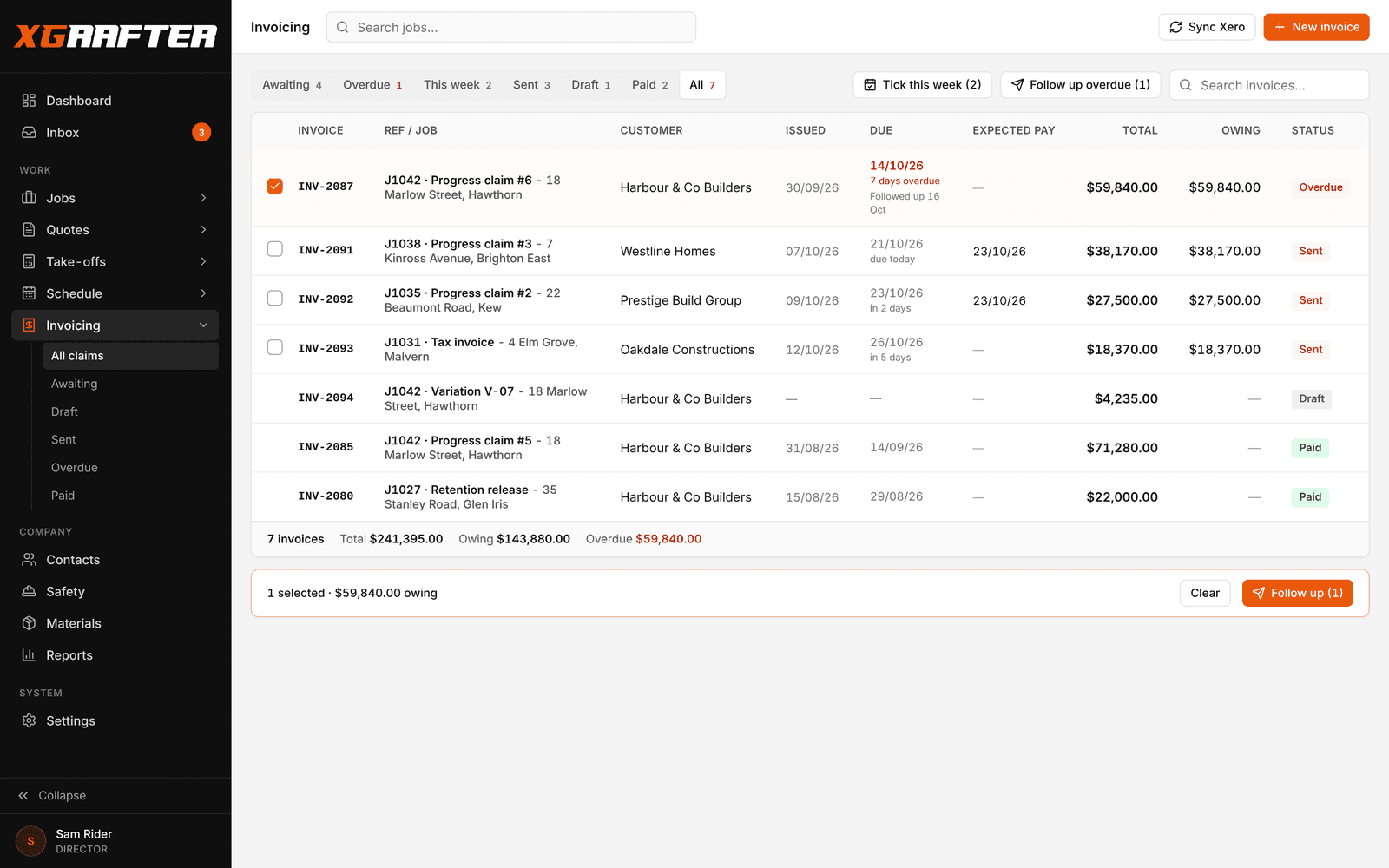
Cashflow. When claims are a spreadsheet and Xero is somewhere else, you claim late, you claim short, and you lose the argument about what was claimed last time. Every one of those hits your bank account.
Invoicing in XGrafter is built for how trade businesses actually get paid: progress claims cumulative to date, per-cost-centre line items showing contract $ / previously claimed / this claim, and a running retention column so nothing surprises you at practical completion. Works the same for a fixed-price fit-out, a per-milestone landscaping job, or a schedule-of-rates plumbing contract.
You issue progress claims monthly (or on your milestones). You issue tax invoices when the payment schedule comes back. You send payment requests when a client goes quiet. The three document types are separate for a reason — because your Xero, your ATO and your client all treat them differently.
Retention support is configurable per job (default 5%, can be anything). It tracks separately, releases on your timeline, and doesn't get folded into the current claim by accident. Practical Completion turns into a Retention Release invoice when you're ready, not before.
Every PDF that goes out the door is branded to your tenant — your logo, your ABN, your address, your terms of trade. Not a generic template. Not a shared footer. Your business, looking like it should.
- Three document types: Progress claim, Tax invoice, Payment request
- Cumulative % claims per cost centre
- Contract $ / Previously claimed / This claim columns
- Retention (5% or configurable) tracked separately
- Retention Release invoice generated on your timeline
- One-click push to Xero (invoice, contact, line items)
- Per-tenant branded PDF (logo, ABN, address, terms)
- Overdue chasing sequences
Two-way, native, no dodgy middleware.
Invoices, contacts, POs and payments sync live. Live P&L on the dashboard. Cashflow forecast built off your real pipeline.
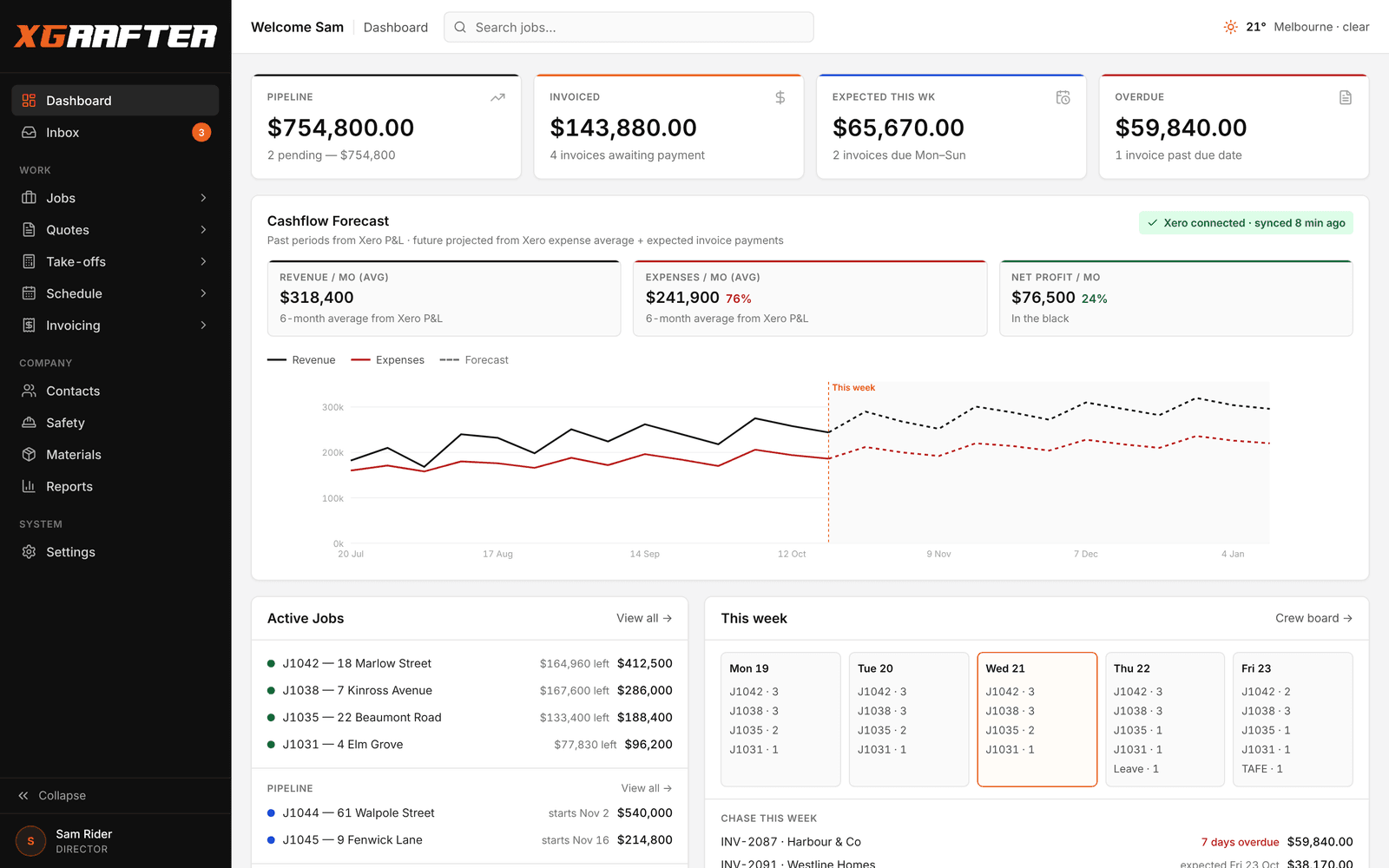
The Sunday-night bookkeeping session where you reconcile jobs to Xero, chase POs, and try to figure out what was actually invoiced this month. That whole session doesn't need to exist.
Xero isn't a bolt-on — it's wired into the platform. Invoices push both ways. Contacts stay reconciled. POs raised in XGrafter turn up in Xero as bills. Payments received in Xero mark the XGrafter invoice as paid without you touching either app.
The dashboard pulls a live P&L view from Xero so you're not tabbing between two screens to see how the month's going. Numbers that matter — revenue this month, cost of goods, gross margin — sit next to your job pipeline instead of underneath it.
The cashflow forecast is what you get when a real accounting integration meets a real jobs database. It's not a straight-line extrapolation from last month's invoices — it's built off stage completion dates on your active jobs, offset by your usual payment terms, layered against your Xero pipeline. It tells you where cash is coming from and when.
Beyond Xero there's a growing list: data imports for migrations off legacy platforms, Dropbox for job documents, and an AU-hosted database (Sydney region). Your data lives in Australia.
- Two-way Xero sync: invoices, contacts, POs, payments
- Live P&L pull on the platform dashboard
- Cashflow forecast built from stage completion dates + invoice pipeline
- Data import for buyers migrating off legacy platforms
- AU-hosted data (Sydney region)
- Photo capture per job / cost centre (site photos linked in)
- Contacts database (customers → contacts → sites)
- PO tracking (raise, track, sync to Xero as bills)
- Reports: cashflow forecast, active jobs, invoiced
And a few things you'd expect at the platform level.
The bits that don't need their own section but matter when you're running a real business.
Enough reading. Have a play.
14 days free. Nothing charged until the trial ends. Full platform, load a real job, kick every tyre.